Graduate Survival Guide
Getting Started and Finding Your Way Around
Visit your department office
We encourage you to stop by your department first, so they know you have arrived in Socorro and can get you started. Your department secretary will help you get keys for your office, building, and labs, and direct you to your department mailbox. This office is usually a place where you can find answers when you need help. The CGS is also a great resource for all things related to graduate students.
Visit The Center for Graduate Studies
The Center for Graduate Studies (CGS) is located on the second floor of the Fidel Student Center, across from the Registrar’s Office.
If you will be working in a paid position on campus (as a TA or RA or hourly student employee):
RA/TA Contracts: Pick up your contract from your department secretary (TAs) or your research supervisor (RAs). Take your contract to the CGS and sign it with office staff.
Assistantships (teaching and/or research) are processed using a contract between NMT and the student. These are important not only because they will get you paid, but because with them all students qualify for deferred payment of tuition and some fees, and nonresident students qualify for resident tuition. Therefore, it is crucial that your contract be completed BEFORE you go to validate so that you will qualify for these accommodations.
I-9 Form: You will be contacted by someone from the Budget & Analysis office when they are ready for you to go to their office to complete the I-9 form. Budget & Analysis is located in Brown Hall, Room 100. The I-9 form is completed once and is valid for your whole career at NMT. Present original versions of documentation to prove your identity and work eligibility. The full list of acceptable documents is in the "student workers" section of this web page: https://w17.nmt.edu/ba-tax-students. You may choose which documents to present. Frequently provided documents are:
- US citizens: photo ID and social security card OR Passport
- International Students: passport, I-20 form, and I-94 admission number
International Students must also obtain a social security number, which is used in NMT's payroll system and the government's income taxation process. Visit the International Programs office for their instruction sheet on how to obtain a social security number. You do not need to have a social security number before starting work, but it should be obtained in a timely manner.
Paydays are biweekly. In order to receive a paycheck on the first payday, your contract must be processed at least 7 business days prior to payday.
If you have a TA/RA contract or another campus job, you have two options for payment:
- Pick up your check at the cashier’s window (Fidel, second floor).
- Have your paycheck deposited directly into your bank account. If you choose to have your check direct-deposited, you must fill out a form at the Payroll Office (Wells Hall, Rm. 113, second floor). You will need to attach a voided check to the form.
Audits: Students on contract (or not) may audit one course (normally at most three credits). Audited courses do not earn credit and may not be used toward any degree.
When you first arrive at NMT, immediately take your documents (including proof of health insurance) to the International Coordinator (Fidel, Rm. 268, Michael Voegerl).
If you want to work on campus, in addition to completing an I-9 form (see above), you will also need to obtain a social security number.
Your Academic Advisor will advise you on the best courses to take. He/she will guide you through the requirements for your degree and approve your semester by semester registrations. After you complete your first semester, he/she will give you your alternate pin # that you will use to register online for courses (see registration process below).
NMT has moved to online registration; however, first-time students will have to register in person at the Registrar’s Office (Fidel Student Center, second floor across from the Center for Graduate Studies (CGS) office) on or before the first day of classes. Present your registration form, signed by your advisor, the CGS, and International Office (International students only, Fidel Student Center, Rm. 268, Michael Voegerl), to the Registrar’s Office. You will receive late fees if you register after classes have begun.
Each semester’s class schedule and the course catalog are available online: https://banweb7.nmt.edu/
Being “validated” means that you are in good financial standing at NMT. It means that you have paid or have made arrangements for payment of your tuition and fees on or before the start of classes. If you validate after the start of classes you will receive late fees. If you delay further, you will be dropped from all classes. If you have a TA/RA contract, you have two options for payment: You may pay your entire balance (tuition and fees) at the Cashier’s Office, OR payments for tuition and certain required fees may be distributed over the semester with a Graduate Deferred Payment (GDP) Plan. The GDP Plan allows you to defer payment of tuition (up to 13 credit hours) and required fees. Instead of paying these tuition and fee charges at the time of registration, they will be deducted in equal installments from your paychecks during the semester (depending on date the contract is signed by the Graduate Dean). The GDP does not cover lab fees, room and board, or tuition for any credit hours above 13. To choose the GDP, you must sign the appropriate form at Student Accounts (Fidel, Rm. 231, Gigi Garcia) when you get your contract. You must set up a new GDP each semester. The remaining balance, not covered by your GDP, must be paid by the first day of classes.
Know Your NMT ID Number – you will need this for practically everything you do at NMT!
These are obtained in the Registrar’s office (Fidel Student Center, second floor). You can get this when you register. Your ID card is used to check out books from the library, to check out equipment from the gym, to check out software manuals from the computer center, and as proof that you are a student at NMT (including for discounts at many local businesses).
The fee for your campus mailbox is included in your student fee. Go to the Campus Post Office to be assigned a campus PO Box (Fidel, first floor, past the NMT Bookstore).
You may get a key request form from your department secretary. If you know what project you'll be working on, your research advisor should be able to tell you for which labs you will need keys. Your advisor must sign the key request form. Don't forget to include your office key and the building key. Take the key request form to the Key Control Office,(Fidel Center, first floor). The key deposit is $5/key. After you have been notified that your keys are ready, go to the Cashier's Office (Fidel Center, second floor) to pay the $5/key deposit. Take your receipt to Key Control Office, (Fidel Center, first floor) to pick up your keys.
It is crucial that you have a NMT computer/email account. Announcements related to classes, degree progress, scholarships, and job opportunities are increasingly communicated via email, and you are responsible for reading them. Once you set up the account, you can forward emails to your personal email if you wish to do so. To set up your campus computer/email account, please go to the Tech Information Technology Center (ITC) in Speare 5.
If you have a computer at home and would like to be able to access the TCC computers, you will be charged a monthly fee. The ITC web page includes instructions on how to access NMT restricted pages from off campus as if you were physically located on campus (i.e., using NMT's VPN).
Full Time Status: To be a full-time graduate student, you must enroll in and satisfactorily complete 9-12 credit hours of upper division courses towards your degree per semester (12 credits if you have an assistantship). First-year students typically take three classes and fill the remainder of the 12 credit hours with directed research or seminar. If you do not have an assistantship, you may register for and complete as few as 9 credit hours of academic classes; however, tuition and fees are the same for 9-12 credit hours.
Registering for lower-level classes: If you must register for a 100 or 200-level class, you will need to fill out a special form. These classes cannot be used as credit toward your degree, but you may need them as prerequisites for other classes or as deficiencies. You may get the form online or from the Center for Graduate Studies.
13th Credit classes: Full-time students can register for a 13th credit that is recreational (physical recreation, health and wellness, etc.) without extra charges. Such courses do NOT count toward full time enrollment (either with or without a contract).
Health Care Center
Access to the Student Health Center is provided by fees paid by all full-time students. Part-time students and dependents of students may be covered with payment of an additional fee. The New Mexico Tech health center is open to students five days per week while school is in session. The health center is located in the Fidel Student Center (Building #14). The health center is staffed by a nurse practitioner and an RN, and provides primary care free of charge, except for costs incurred for laboratory analyses. They will refer you to a specialist or another doctor if necessary.
Graduate Student Orientation: New graduate students starting in the fall semester are required to attend the Graduate Student Orientation, hosted by the Center for Graduate Studies, on the first Monday evening of classes.
Graduate Student Guide: All graduate students are responsible for familiarizing themselves with the Student Handbook and the Graduate Student Guide contained therein, available online at:
http://w17.nmt.edu/student-handbook
Program Requirements: Students should also read their department’s requirements for a graduate degree in the current catalog, available online (via banweb7.nmt.edu)
Teaching Assistant Orientation: All students who have a teaching assistantship and who have not fully participated in the annual teaching assistant orientation within the last three academic years are required to participate in orientation the Thursday and Friday of the week preceding commencement of fall classes. Contact CGS for details.
You are responsible for knowing the requirements of your graduate degree and program. They are found in the catalog that you were admitted under. Please see the catalogs page for the correct catalog and read pages on graduate school and your program.
You are responsible for knowing the material in the student handbook. Pay particular attention to the sections on Responsible Conduct and Graduate Students. Please see the catalogs page for the Student Handbook and read pages on the above material.
Teaching Assistant Training: New teaching assistants starting in the fall semester are required to attend the teaching training, hosted by the Center for Graduate Studies, on the Monday and Tuesday before classes begin. TAs who miss the training or begin in spring are required to watch the training videos and have a discussion with the Dean of Graduate Studies.
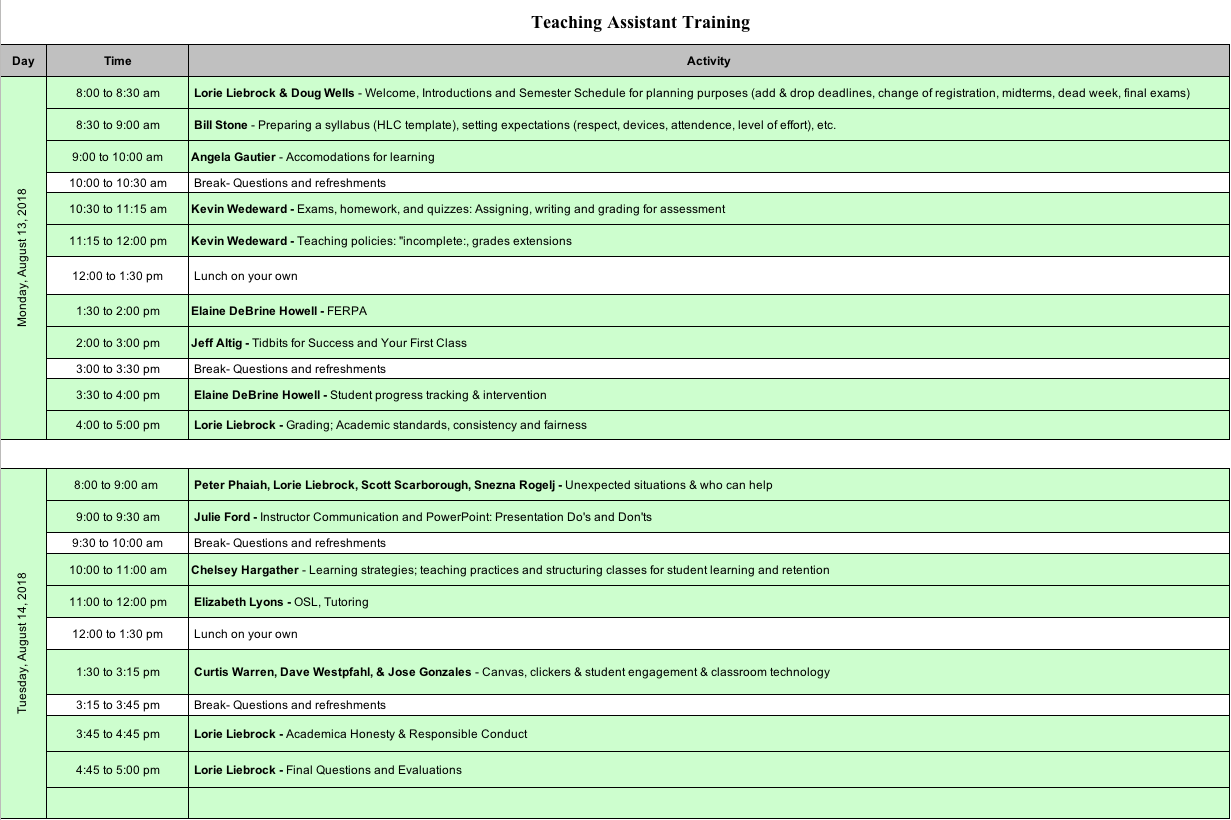
Training Materials - will be uploaded shortly.
Monday's Training Materials
| Time | Speakers(s) | Subject |
| 8-8:30 | Lorie M. Liebrock | Welcome & Calendar |
| 8:30-9 | Willam D. Stone | Syllabus & Expectations |
| 9-10 | Angela Gautier | Accomodations |
| 10:30-11:15 | Kevin Wedeward | Assignments for Assessment |
| 11:15-12 | Kevin Wedeward | Teaching Policies |
| 1:30-2 | Elaine Debrine Howell | Student Progress Tracking |
| 2-3 | Jeff Altig | Tidbits & First class |
| 3:30-4 | Elaine Debrine Howell | FERPA |
| 4-5 | Lorie M. Liebrock | Academic Standards & Grading |
Tuesday's Training Material
Completion Checklist
File a course program with the Center for Graduate Studies (CGS) at least a month before the end of the semester in the semester before your last semester (approximately 7 months before completion).
Intent to Graduate form filed with registrar. See the registrar's web page for forms and deadlines.
Submit your Thesis/Dissertation for format check to http://www.etdadmin.com as a searchable PDF at the same time you submit to your committee for review. If this is not done in advance, corrections may delay the completion of your degree and you will be required to register if everything is not completed before the next semester begins. We recommend that you use the LaTex template when writing since many students have issues with corrections when using Microsoft word. You can find the template on the current Graduate Students web page. Make sure you have included all required permissions (for use of copyrighted material) in the last appendix of your thesis.
Pick up your course program from your file in CGS before you defend your Thesis or Dissertation. You will need signatures from your committee.
Fill out the copyright form and return it to CGS. Obtain all necessary permissions to use any copyrighted or proprietary material in your Thesis or Dissertation (i.e figures, tables) and attach them to the copyright form. NOTE: You must submit all permissions to your academic advisor at the time of defense.
Turn in the hard copy Thesis/Dissertation signature page signed by your advisor and committee. Insert your signature page into your digital Thesis or Dissertation with all signatures typed above the signature line and inserted immediately before page 1. Note this is already in the LaTeX template.
Your Thesis/Dissertation is not complete until you receive an email from ProQuest stating that it has been accepted. You must be available to edit your document if you receive an email from ProQuest stating that there are changes to be made. NOTE: Please ensure that your name is identical in ProQuest, title page, signature page and copyright page for plagiarism purposes. (Thesis/Dissertation will be checked for plagiarism before it is accepted.)
Provide a permanent email address.
Provide CGS with a prepaid medium size, fixed rate shipping box that is preaddressed for your bound thesis delivery. Alternately, if you or your designee will be picking it up, you must provide that information including email contact information.
Have your Research Advisor submit your defense report; they can submit that by hand or via graduate@nmt.edu.
Fill out the Graduate Exit Survey by going to https://docs.google.com, while logged into your student google email account, in the search bar type in Graduate Exit Survey, print the confirmation page and turn it into CGS by hand or via graduate@nmt.edu.
If you are a PhD student you can fill out the survey by going to https://sed.norc.org/doctorate.
Once you have completed everything on this checklist and we have received all documentation the completion process will take place approximately one week IF there are no problems with your documentation or thesis. We will review everything in its entirety to ensure course programs and transcripts match, there are no grades below a C and that the GPA is 3.0 or above. The Dean will confirm all is well and you will then be added to the registrars list of graduates. If you have completed a thesis or disseration you will receive an email from us via ProQuest when your thesis has been accepted.
If there is anything missing we will reach out to you via email. If you do not respond, it will delay your graduation and if it delays your completion into the next semester, you will be required to register; only current students may graduate.
NOTE: If you are completing a MS with independent study or a professional Masters degree disregard 3, 5, 6, 7, 9, 10 and 12. You must submit your abstract as PDF well as a permanent email address to graduate@nmt.edu.
Thesis Information
We strongly encourage you to use LaTeX for your thesis or dissertation. Even if you are just learning LaTeX, this will save you a great deal of time and effort on formatting and reduce related delays to graduation.
The template is found in the linked zip file. You may install a LaTeX compiler on your system or use an online system (e.g., this template and style has been tested in ShareLatex, which is free and does not require installation).
Using MS Word for a thesis is depricated and the old template is not being maintained, but is here for diehard fans of difficult formatting challenges. MS Word thesis template - Using this package does not ensure that the thesis will satisfy the Graduate School requirements. It is deprecated specifically because standard things done in theses will break the template and create a very difficult to format thesis.
All format checking is performed after you upload your thesis or dissertation to ProQuest. We recommend you upload a copy (searchable pdf) when you send your first copy to your advisor.
You should read the ProQuest section on copyright at http://www.proquest.com/products-services/dissertations/submitting-dissertation-proquest.html and the linked document Copyright and Your Dissertation or Thesis: Ownership, Fair Use, and Your Rights and Responsibilities that you will find in the ProQuest page. These documents provide excellent guidance on copyright law in the United States for academic work. Legally, we must follow the law and it is easier for you to prepare to meet the copyright requirements as you proceed with your research rather than have to address them at the completion stage.
| What must be completed | Recommended Date | Required Date |
| Submit Intent to Graduate Form to registrar (see forms) | 6 months prior to expected completion | |
| Draft independent study/thesis/dissertation to graduate research advisor | 8 weeks before Defense | |
| Defense copy of independent study/thesis/dissertationto graduate committee | 2 weeks before Defense | |
| Defense copy of thesis/dissertation in pdf format submitted to graduate@nmt.edu for format check/correction | 2 weeks before Defense | |
| Defense: independent study/thesis/dissertation defense | 3 weeks before Completion | |
| Make corrections to independent study/thesis/dissertation resulting in final version -- watch for emails and check carefully that all corrections are completed before resubmitting. | ||
| iThenticate check of final versions of thesis/dissertation (or independent study for MST) by academic advisor. Student must submit all copyright permission forms to advisor before the check can occur. The report must be signed by the advisor and submitted with completion paperwork. | 2-3 weeks before Completion | |
| Get committee signatures for completion | 2-3 weeks before Completion | 2 weeks before Completion |
| Completion: All paperwork signed and delivered to CGS; pdf version of final thesis/dissertation (correctly formatted) submitted to ProQuest AND advisor must submit iThenticate report |
10 business days before completion (see NOTES below) |
- Completion NOTES
-
- During the semester: 10 business days before the last day of final exams or proposed completion date.
- During the semester to be conferred at graduation in May: 10 business days before the last day of final exams;
- Between semesters: 10 business days before the first day of class in the subsequent semester (spring, summer, or fall)
CHECKLIST_FOR_COMPLETION - these are the things you must do as you near the end of your program. See above.
Thesis/Dissertation Manuscript Requirements Please note that these requirements state that your thesis or dissertation must be double spaced. The spacing was changed in Spring 2014 (see above). The requirements are being updated and will be replaced soon.
All theses and dissertations must be submitted via the NMT ProQuest site.
Graduate Exit Survey: Online exit survey that evaluates program performance and student satisfaction. Print out the confirmation page and turn it in to the Center for Graduate Studies with your completion paperwork.
Every thesis and dissertation will be checked for plagiarism before it is accepted. If you are found to have plagiarized your thesis or dissertation, you will be suspend from the program. Read the Academic Honesty Policy and Guide to Conduct and Citizenship for Graduate Students is found in the current Student Handbook on the Catalogs page. If you have questions, get help; do not commit academic dishonesty.